2025-11-12 4:40:15 AM
Status:
Tags:
Note
Follow this guide if you want to play the game on any server (Hi-Rez, community, or private) while also being able to customize your client-side experience with TAMods, have administrative capabilities via TAMods, and play on both OOTB and GOTY-like servers.
Arch Linux
From the tamods.org documentation here, it states the following:
Note
TAMods is an unofficial modding framework for Tribes: Ascend which allows you to customise nearly every aspect of the game experience. You can customise your UI and the graphical look of your game, modify game hitsounds, record capping routes and view them via a UI guide or via a bot replay, and much more via built-in custom options and via Lua scripting.
TAMods does not allow any gameplay-affecting changes, so that players using TAMods have no in-game advantage over those who do not.
- Start by downloading the official
Tribes: Ascend - Parting Giftsgame client (or install Tribes: Ascend via Steam but this guide assumes non-Steam). - Download the latest
Tribes Launcher Sharphere (latest is v2.2.0 as of this writing): https://github.com/mcoot/TribesLauncherSharp/releases
Note
It isn't necessary to use Tribes Launcher Sharp, but it is recommended because it "automatically keeps TAMods up-to-date, and allows you to run Tribes with TAMods enabled."
- Extract the
Tribes Launcher Sharp.zip file where you'd like it to live. I have it living here:/home/adman/Games/Tribes - Ascend/TribesLauncherSharp-2.2.0 - In my case, since I already had Tribes: Ascend added regularly to Lutris, I opened Lutris, went into the Tribes: Ascend settings, and pointed the executable to the
TribesLauncherSharp.exeand kept the same Wine prefix. I also removed the-hostxentry from Lutris since the launcher will handle it now. - Run the Tribes launcher via Lutris. Say yes to this popup when it happens:
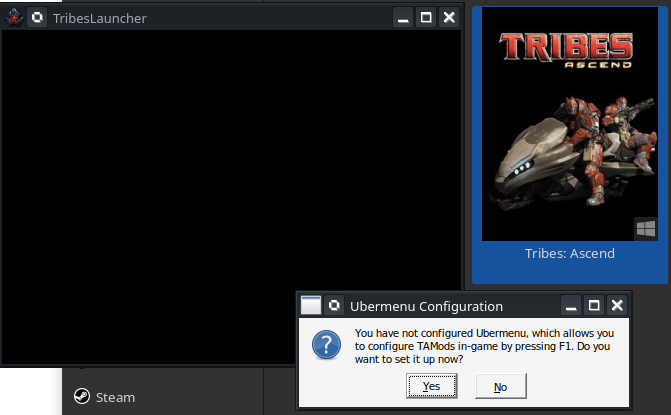
Hovering your mouse over the black box should cause the display to appear:
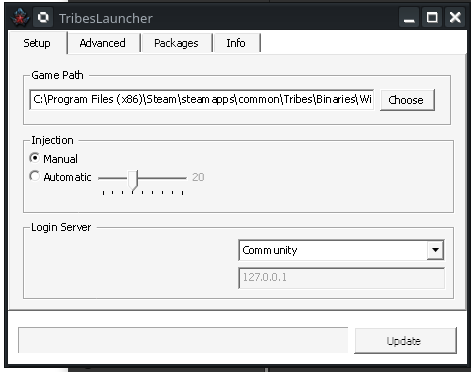
- Modify the
Game Pathfield to point to your game client'sTribesAscend.exe. For me, that here:/home/adman/Games/Tribes - Ascend/Tribes_Ascend_Parting_Gifts/Binaries/Win32/TribesAscend.exe - Press the
Updatebutton in the bottom-right. After it finishes installing TAMods, it should change toLaunch. - Click the dropdown in the
Login Serversection and select from the three options ofCommunity,Pug, andCustom(I'm not sure why official isn't also an option. Update: I see he commented outHiRezin the Launcher Sharp source code fileConfig.cs). For me, I selectedCustomand put in my desired IP address. - Click
Launchto launch Tribes: Ascend. - Once on the main menu, tab out and click
Injecton the sharp launcher to inject TAMods into your running game client process. You should hear a blueplate sound if it's successful.
Note
On the Tribes Ascend Launcher Sharp, you can change the injection method from Manual to Automatic to skip the injection step. And the number slider is how many seconds it waits after you click Launch to attempt to inject the game. Otherwise, you need to do the manual method every time you start the game.
- Log in and play. You can test if TAMods is active by going into a game (roam map mode works too), pressing
Escto open the menu, and then pressingtto open the Tribes: Ascend console (the~key opens the Unreal Engine console). You should see TAMods Ascii art like this to indicate that it's enabled:
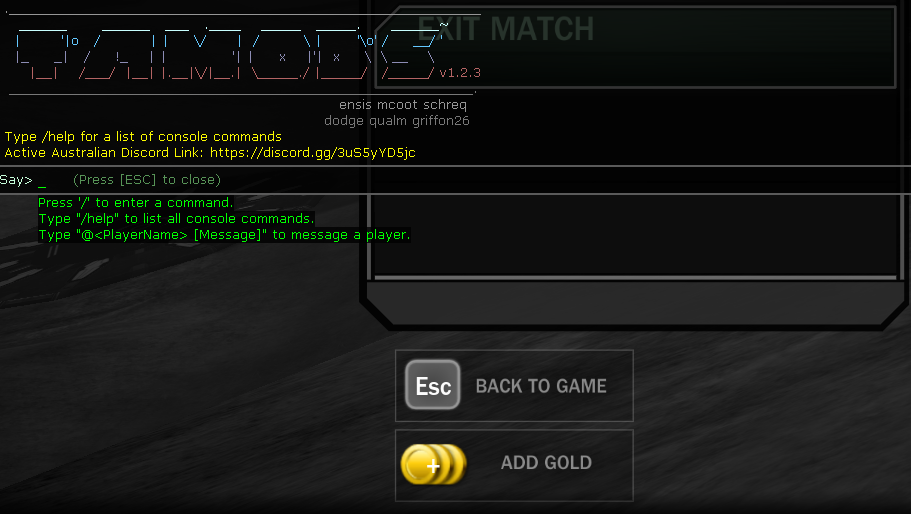
Note
Note that TAMods also changes the way your chat box (I think) looks for some reason.
- Assuming you enabled the Uber Menu when first launching Tribes Launcher Sharp, press
F1in-game to open the TAMods menu and configure whatever you like.
Note
Whenever I close the game while running it through Tribes Ascend Launcher Sharp it says the game crashed. I just ignore it.
GOTY Mode
To join GOTY servers, simply click the Switch to GOTY menu option in the game.
Note
You must be in the correct mode to match the game server you're trying to join. If you aren't, you will get an error message.
Removing the flag grab chat popup from TAMods
By default, TAMods pops up a chat message in the top-left of your screen any time you grab the flag. That is the stopwatch feature. You can disable that pop-up notification by pressing F1>TAMods Settings>HUD>Stopwatch>Notifications and changing that setting from Yes to No by pressing the right arrow over it to have it give you the command, then edit the command to look like this: /lua stopwatchNOtifications = false , then press Enter and then hit the Apply option at the bottom of the TAMods window.